Your website looks and feels like your organization. A branded ticketing experience carries that same familiarity through event discovery, ticket selection, and checkout.
When someone clicks “Buy tickets,” a sudden change in branding, navigation, or page layout can interrupt the momentum you’ve built. Keeping the experience familiar helps buyers stay focused on choosing their tickets and feel confident purchasing from you.
What happens next should build on that interest. But when a familiar website leads to a ticketing page with a different look, unfamiliar navigation, or unclear pricing, buyers have more to figure out before they can commit.
A connected journey helps them recognize who they are buying from and understand what to do next. Your brand stays present as they explore events, choose tickets, and complete their purchase.
AudienceView Websites, the Custom Browsing Experience, and the New Buyflow connect three parts of that journey: helping people discover what’s on, find the right ticket options, and buy with confidence.
Make your website a useful place to discover events
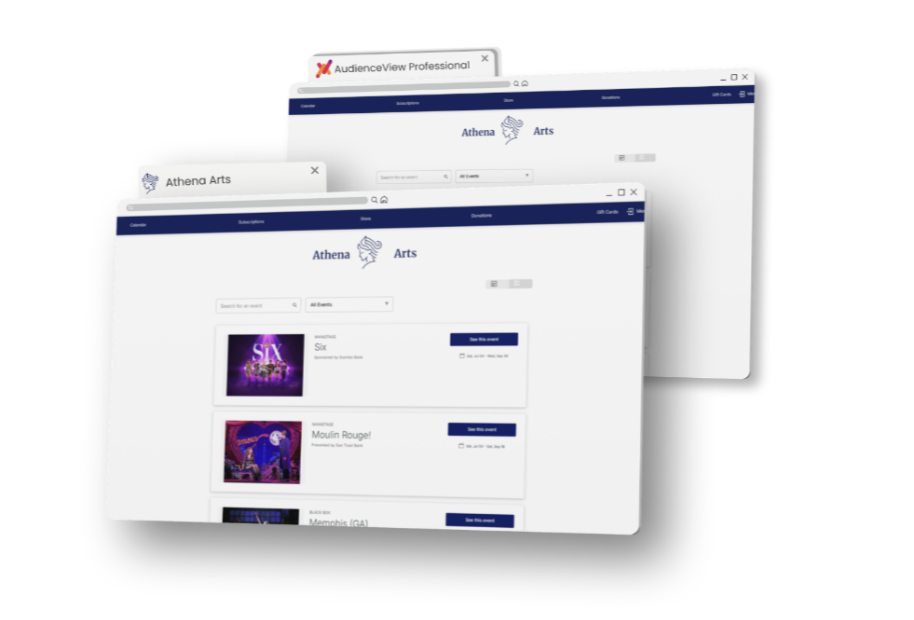
Some visitors arrive knowing exactly what they want to see. Others have a free Saturday and are looking for a reason to go out. Your website should help both move toward a decision.
That means presenting your programming in a way that makes sense to your audience. For example, a performing arts organization might help visitors explore a season or compare performance dates. A venue hosting several shows in one night might put greater emphasis on times, spaces, and the details that distinguish each event.
Useful event pages answer the questions buyers need to resolve: What is the event? When is it happening? Where will it take place? How do I get tickets? Calendars help them see how those options fit into their schedule.
AudienceView Websites provides a branded starting point for this experience, giving organizations a place to introduce their programming and help visitors decide what to attend.
The goal is to make the next step feel natural. Someone who finds an event that interests them should have a clear route to exploring tickets.
Shape browsing around the way your audience buys
Once someone is interested, the browsing experience needs to help them narrow their choices.
The right approach depends on your programming and your audience. For example, a busy event calendar, multilingual audience, or mix of general admission and reserved seating each calls for a different browsing experience.
AudienceView’s Custom Browsing Experience gives organizations greater flexibility over this part of the journey, supporting custom event pages, calendars, and ticket selection experiences that keep the organization’s brand present.
That flexibility takes several practical forms:
- A calendar suited to a busy schedule. Flexible views and filters help visitors find a relevant event without working through a long list of performances.
- Browsing in the languages your audience uses. Localized event information helps buyers understand their options and move toward ticket selection more comfortably.
- A clearer route to different seating options. Custom event pages guide buyers toward general admission or reserved seating, with an embedded seating chart supporting reserved seat selection.
For buyers, the benefit is straightforward: As a result, relevant events and ticket options are easier for buyers to find. For your organization, it creates more room to shape discovery around how you present your programming and how your audience chooses to attend.
Carry that familiarity into purchase
When a buyer is ready to order, they should be able to keep moving with confidence.
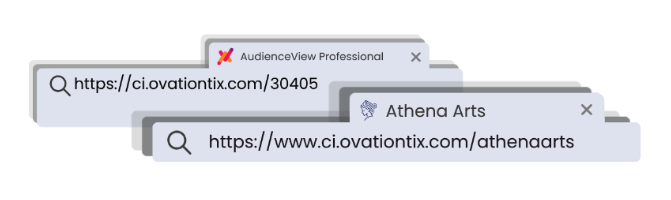
Small details help maintain that familiarity. A branded URL, a recognizable browser tab icon, and a consistent interface reinforce that they are still purchasing from your organization.
AudienceView connects those brand details with a consistent cart and checkout experience. The New Buyflow continues the journey by focusing on what buyers need to complete their order: clear pricing, an easy order review, and straightforward payment.
Here are areas that deserve particular attention.
- Show the price early. Buyers need to understand the cost while they are making their decision. AudienceView’s fee transparency features bring mandatory fees into the price shown earlier in the purchasing experience, helping buyers assess their options with clearer information.
- Make the order easy to review. Before paying, buyers should be able to confirm the event, performance date, ticket choices, and total. A clear cart helps them check that the order matches what they intended to buy.
- Reduce unnecessary typing. Entering address details can slow the final steps. Address autocomplete makes that process easier and helps reduce inconsistencies in the information buyers enter.
Together, these features support a purchase experience that feels familiar and gives buyers fewer questions to resolve along the way.
What a connected journey can look like
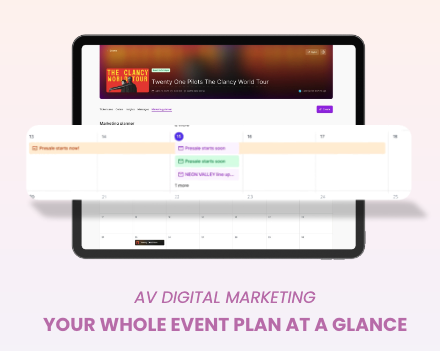
Imagine someone clicking a campaign email for your upcoming season.
They land on your organization’s website and explore the programming. A calendar helps them find a performance on a date that works for them. They open the event page, review the details, and follow a clear route to their preferred ticket option.
As they choose tickets, they can see the price, including mandatory fees. They move into a familiar cart, confirm their selection, and complete payment.
Your organization remains recognizable throughout. The branding carries through, the information supports each decision, and the next step is easy to find.
That continuity helps turn the interest your campaign created into a completed purchase.
Give buyers confidence from first click to final confirmation
Owning your ticket buying journey means thinking about every step that brings someone closer to attending.
Your website helps them discover an event. Your browsing experience helps them find the right performance and tickets. Your buyflow helps them review their choice and complete the purchase.
Together, your brand becomes a familiar presence throughout the journey, giving buyers a clearer path from “What’s on?” to “I’ll be there.”
Explore how AudienceView can help you create a more connected, branded ticket buying experience.